
FIELD GUIDE / WAVY HOOP Nº1
Opal.LED hoop
Featuring magnetic gesture control and hoop-as-display technology.
No buttons or remote needed.
$100 USD + shipping · First 10 hoops
EARLY ACCESS · COMING SOONEXPLORE OPAL
02 / MAGNETIC CONTROL
Swipe & hold.
Like it? Keep it.
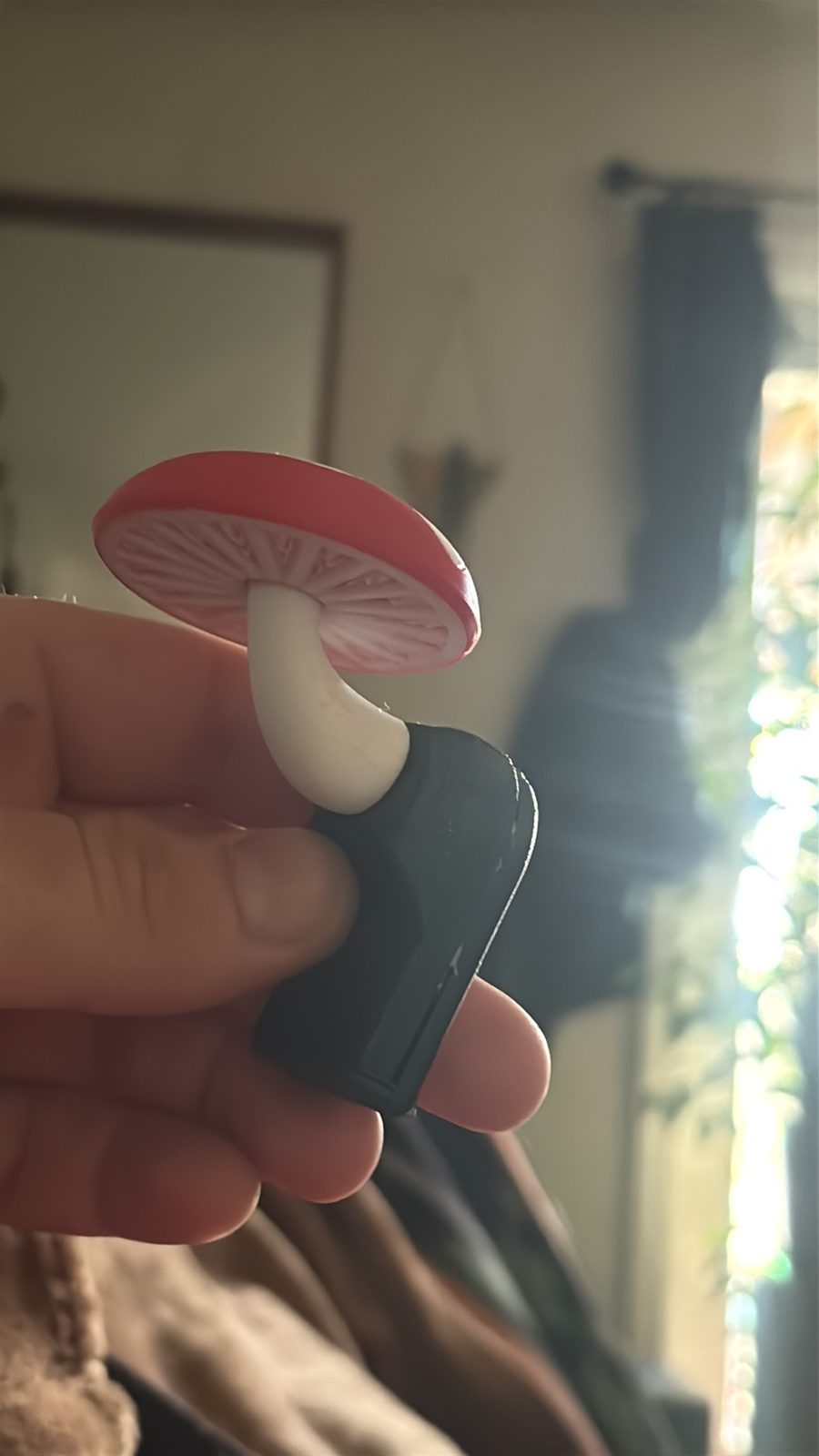
Opal uses magnetic gesture control. The pendant needs no battery, and locking the hoop prevents accidental pattern changes. Swipe the pendant past the sensor to change patterns, or hold it there to select.
Hold 3 seconds for the menu. Keep holding to 6 seconds to lock.
Swipe the mushroom past the sensor.
Red · LockGreen · Unlock / play
Unlock with a 3-second hold. Leave a menu for 15 seconds to save and play.
03 / HOOP AS DISPLAY
The hoop is
the display.
Opal’s LEDs show what you’re changing. Each menu item has its own color. In the Effects menu, count the bright blue dots by the join to see which of the 12 effects you’ve selected.
Menu · Brightness
- White · Brightness
- Pink · Color
- Blue · Effect
- Gold · Speed
04 / REMOVABLE BATTERY
Swap the cell.
Keep your settings.
Open the connection. Replace the battery.
Reconnect. Your settings come with you.
Protected 14500 cell · Charge outside the hoop.
OPAL / UP CLOSE
Meet your hoop.
Built by hand, one at a time.
OPAL / YOUR FIELD GUIDE
An LED hoop.
Made to be played.
Meet Opal, Wavy Illuminations’ first LED hoop, built by hand by Clay. Use the mushroom pendant to choose a pattern, change its colors and effects, and lock your selection while you flow. No app is needed.
Small pendant. Plenty to play with.
- Price
- $100 USD plus shipping for the first 10 hoops
- Patterns
- 24 patterns · 6 color modes · 10 unique effects + 2 mix modes
- Adjustments
- 5 brightness levels · 5 speeds
- Tubing
- ¾ inch
- LED strip
- 30 LEDs per metre
- Power
- One protected 14500 cell, charged outside the hoop
- Controls
- Magnetic mushroom pendant and sensor
Your size. Your flow.
Tell us your preferred inside diameter from 15″ to 38.5″ when you join the waitlist. Final order options will be confirmed before sales open.
Read the LED hoop sizing guide
What’s in the box?
The final package contents, including whether a battery, charger and printed field guide are included, will be confirmed before ordering opens.
Ordering and support
Orders are not open yet. Joining the waitlist is free and does not take a payment or reserve a hoop.
Help & care.
How do the pendant controls work?
Swipe past the sensor for the next pattern. Hold for 3 seconds to open the menu; keep holding to 6 seconds to lock. While locked, hold for 3 seconds to unlock. The menu changes brightness, color, effect and speed. Actions happen as the ring fills.
Can I keep one pattern instead of shuffling?
Yes. Choose a pattern and use the lock. Quick Mix and Megamix intentionally change patterns automatically; select another effect if you want to keep one pattern playing.
What happens when I replace the battery?
Opal remembers your pattern, lock, brightness, color, effect and speed. Reconnect the hoop and the battery gauge appears before playback resumes.
What is the difference between Color and Effect?
Color changes the palette, including an all-white option. Effect changes how a pattern appears, with options such as Mirror, Kaleido, Dashes, Spotlight and Sparkle. Six colors and twelve effects make 72 combinations per pattern; some combinations can look similar.
How do I care for my LED hoop?
Keep it dry. Charge the protected 14500 cell outside the hoop. Check the battery gauge by reconnecting the ends. If the charge is good but the light is dim, check brightness in the menu. MAX uses the battery faster; in White, MAX displays at High.
Are these videos of the real hoop?
The 3D scenes and simulator are browser animations using the supplied Opal v4.5 engine. They are not footage. Real product photos and flow videos will be added separately.
What are the shipping and warranty terms?
Shipping rates, delivery estimates, return terms and warranty coverage are being finalized before orders open. See the current ordering information or contact Clay.
OPAL / THE FLOW LAB
Take Opal for a spin.
Mix 24 patterns with six color styles and twelve effects. That’s 72 combinations per pattern.
Start with a swipe. Then pick a spin, reverse it, or turn on tracers to see the light trails. The simulator shows an animated preview.
LAUNCH UPDATES
See you in the glow.
Leave your email and, if you know it, your preferred hoop size. We’ll email you when Opal is ready to launch.
First release: 10 hoops at $100 USD each plus shipping. Joining is free and does not reserve a hoop.